
Jellyfin
This page is for connecting Mantle to your own Jellyfin server and playing from it. It shows what you need, how to sign in with Quick Connect or a user name and password, what appears where, how the server's files play, and how to bring in what you watched there.
What you get
- Shelves on Home from your server: what you were watching, and a "New in" shelf for each of its libraries.
- Your server's films and series in search.
- Full details for titles on your server: cast, crew, studios, trailers and a series' episode list.
- Your server's files as sources, for any title it has. This works for a title that came from another plugin too, such as Cinemeta. The title page then offers the file on your server next to the other sources.
- An importer: your favourites, what you watched, where you stopped and your playlists come into Mantle.
Mantle reads from Jellyfin. It does not send Jellyfin what you watch in Mantle.
Before you start
You need:
- A Jellyfin server that Mantle can reach. Use the address you open in a browser, for example
http://192.168.1.10:8096. - A Jellyfin user. Quick Connect must be on for that server, or you need the user's name and password.
- A way for the device that plays the video to reach the server too. Mantle asks Jellyfin for titles, but the video itself loads straight from the Jellyfin address into the player. With the desktop app, the player's device is your computer. With the web build, it is the browser, which from an
https://site reaches only a server at anhttps://address (orlocalhost). With the Android app, it is the phone. If you use Mantle from a phone away from home, a private address such as192.168.1.10will not play.
Connect
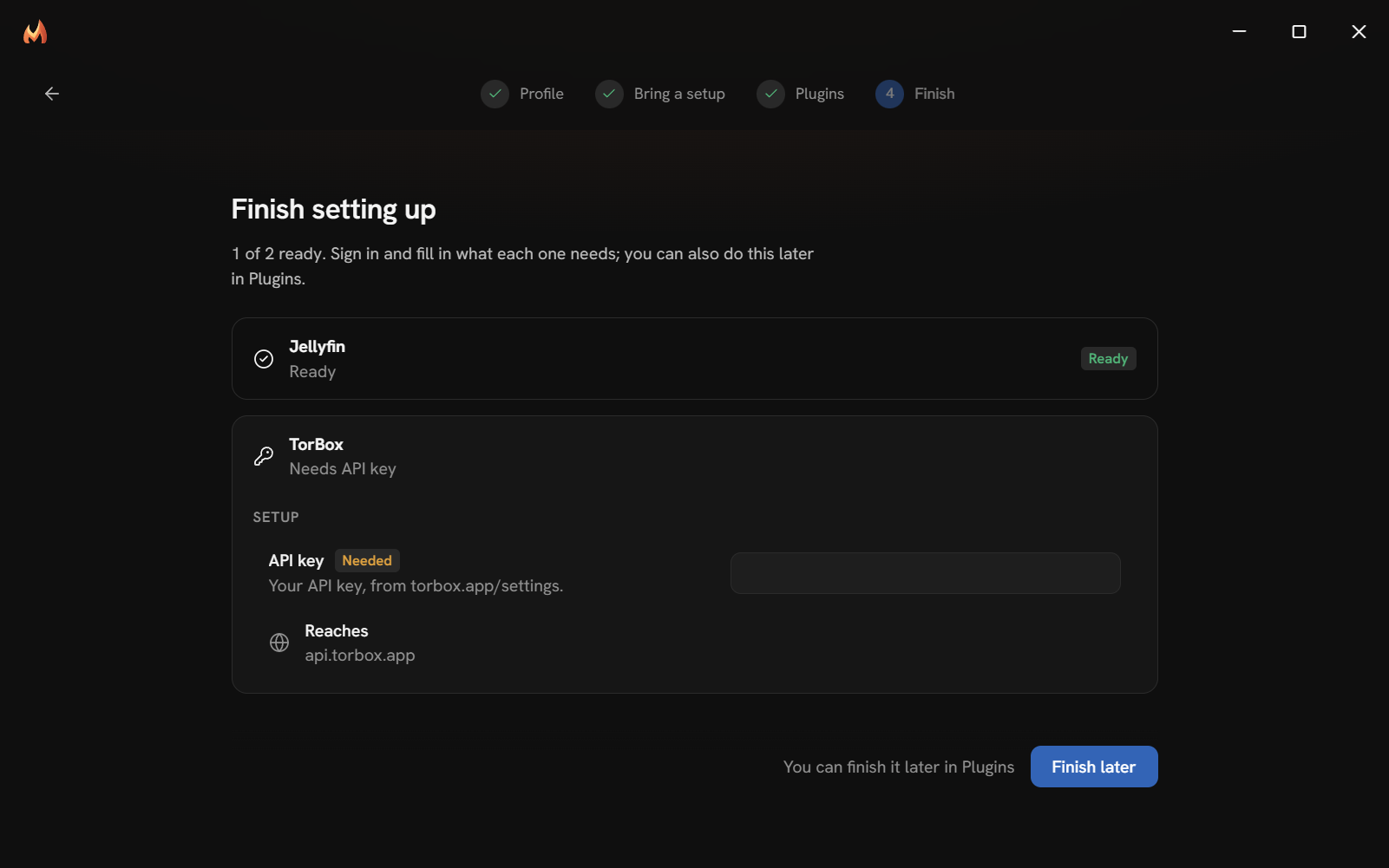
- Open the Plugins page and turn Jellyfin on. If you are in the first run, turn it on in the Plugins step and set it up in the Finish step.
- Open Jellyfin's row. Under Setup, fill in Server: "Your Jellyfin server's address, as you open it in a browser." Press Save.
- Sign in, using Quick Connect (below) or a user name and password.
If you paste the address of Jellyfin's web page, for example one ending in /web/#/home, Mantle cuts that part off. An address with a path, such as http://example.com/jellyfin, keeps its path.
Until you set the address, the plugin shows Needed beside Server, and Home leaves its shelves out.
Sign in with Quick Connect
- Under Account, press Sign in with Quick Connect.
- Mantle shows "Enter this code at" and your server's Quick Connect page, with a code in large type. The code lasts 10 minutes.
- Press Open Jellyfin. It opens your server's Quick Connect page. Sign in to Jellyfin there if it asks.
- Enter the code and confirm.
- Mantle checks every few seconds. When Jellyfin accepts the code, the row reads "Signed in as" and your Jellyfin user name, with a badge that gives the server's name and version.
If Quick Connect is off, Mantle says so: "Quick Connect is off on this server. Turn it on in Jellyfin (Dashboard, General), or set a user name and password in the settings."
Sign in with a user name and password
Use this if you cannot use Quick Connect.
- Under Setup, fill in User name and Password. The password is a secret: Mantle keeps it with its other credentials and never shows it again.
- Press Save.
Mantle signs in with them when it first needs to. If you change the user name, Mantle signs in again as that user.
Check the connection
If Jellyfin's row shows Health, press Check. The lines it can give are:
| Line | Meaning |
|---|---|
| Set your server's address. | The Server field is empty. |
| Cannot reach … | Mantle cannot connect to the address. The reason follows. |
| Server name answers (Jellyfin version) | The server is reachable. |
| Not signed in: sign in with Quick Connect, or set a user name and password. | The server answers, but there is no account yet. |
| Signed in as name | All set. |
The plugin may reach only the host in Server, and nothing else. The Reaches row shows it.
Sign out
Press Sign out on the account row. Mantle ends its session on the server and forgets the sign-in. It forgets the saved password too, so that it does not sign in again by itself. The User name setting stays. To sign in again, use Quick Connect, or type the password again.
What appears where
On Home
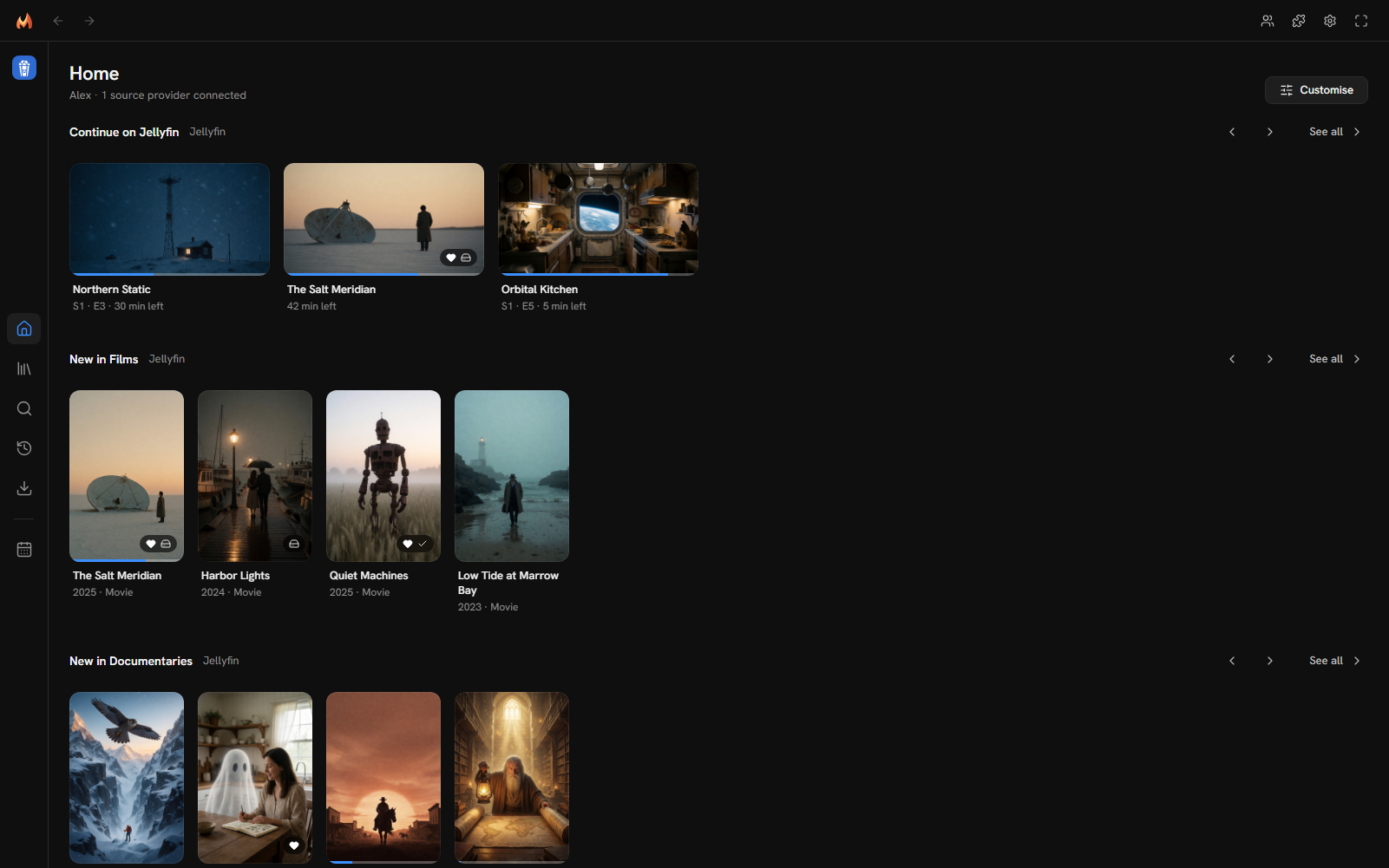
| Shelf | What it shows |
|---|---|
| Continue on Jellyfin | What you started on your server and have not finished, home videos and music videos too. |
| New in library | One shelf for each library you can see on the server, such as "New in Documentaries". The titles added last come first (a series by its newest episode). See all opens the whole library, newest first. |
The libraries come in the order you set on the server. A library of films, series, home videos, music videos or a mix shows what it holds. Libraries of music, books or photos hold no titles, so they have no shelf. A library you left out of "latest" on the server (in Jellyfin's home screen settings) starts off Home: turn it on in Settings → General → Home layout. You can reorder or hide any of these shelves there.
A library added to the server later gets its shelf the next time Mantle reads the plugin: when it starts, when you sign in or out, or when you change its settings. There is nothing to set up. The shelf goes where the library comes in the server's order among your other Jellyfin shelves.
If you had moved "New on Jellyfin" and "New episodes on Jellyfin", which the library shelves replace, the library shelves take the place of whichever of them comes first in your layout, and they are hidden if you had hidden both (one of them hidden leaves them shown). This happens when Mantle first reads your libraries after updating, and only once you are signed in.
Signing out or an unreachable server keeps your layout: the shelves are back where they were, as hidden as they were, when you sign in again. A library deleted on the server loses its shelf and its place in the layout.
In search
Your server's films and series appear in search results for movies and series. Mantle searches the server by name.
On a title's page
A title on your server has its details from Jellyfin: studios, countries, cast, directors, writers, producers, trailers (YouTube ones) and ratings. A series lists its episodes with their names, dates, lengths, overviews and pictures.
Jellyfin knows many titles by IMDb id. Mantle uses that id, so a film on your server is the same title other plugins list. It appears once. A title Jellyfin has no IMDb id for is listed under Jellyfin's own id.
Playing
Press Play on a title. If your server has a file for it, the file is one of the sources.
- For a title from another plugin, Mantle searches your server for the title's name. It accepts a match by IMDb, TMDB or TVDB id. If the title has none of those ids, it accepts a match of name and year.
- For a series, Mantle finds the episode by season and episode number.
- If the server has more than one version of a file, each is a source.
- The sources show where they come from as "Direct · Jellyfin". They are direct links, so there is nothing to prepare, and they are marked Cached.
- Mantle names each source from the file's name and adds what the file says about itself: resolution, codec, dynamic range (such as HDR10 or Dolby Vision) and sound. Mantle reads how a file will play from that name.
- The file's subtitles come with the source, in the player's Subtitles menu. See Subtitles.
Mantle asks Jellyfin for the file as it is stored. Jellyfin does not convert it, so it must be a file the player can play. If a file's sound is TrueHD, or its picture is Dolby Vision without an HDR10 layer, the source is marked with a warning and ranked last. DTS sound plays: Mantle decodes its core, which DTS-HD and DTS:X files have too (a rare DTS-HD file without one does not play). See Settings → Playback → Source selection to change how sources are chosen.
Downloading
A file on your server downloads like any other source. Its link holds the key Jellyfin gave Mantle when it signed in, so Mantle does not save that link in mantle.json. A download remembers which file on the server it is, by Jellyfin's own id for it, and asks the server for a link when it needs one.
- Mantle restarts during a download: when the download goes on, Mantle asks the server for the file again and carries on from where it was.
- The server refuses the link part-way (it signed Mantle out, or its key changed): Mantle asks the server again, signs in again if it has a user name and password, and carries on.
- You signed out of Jellyfin in Mantle: the download fails with "Sign in to Jellyfin first". Sign in, then press Retry.
- The server no longer has the file: the download fails with "The provider no longer has it".
- A finished download keeps no link at all. If its file goes missing and you download it again, Mantle asks the server for it.
Subtitles
A file's subtitles on your server are in the player's Subtitles menu, marked "Jellyfin", beside any that a subtitles plugin finds.
| Kind | In Mantle |
|---|---|
| Text (SRT, ASS, WebVTT and the like), in the file or beside it | Shown as the player's own line. Jellyfin sends them as WebVTT. |
| A Blu-ray's pictures (PGS) | Shown as they are on the disc: Mantle draws each picture where it was made to be on the film. Those near the bottom are raised above the controls while the controls show. Jellyfin sends them as they are in the file, and nothing is transcoded. A server that says it cannot send one lists it as "Blu-ray pictures", and it cannot be chosen. |
| A DVD's pictures (VobSub), and a TV broadcast's (DVB) | Listed, but they cannot be chosen. The menu says "DVD pictures" or "TV pictures". Jellyfin can only burn them into the picture by transcoding it, and Mantle plays files as they are. |
When a file's picture subtitles are chosen, Jellyfin reads through the file to take them out of it, which can take a while for a large one. A language's full subtitles come before its forced ones (a film's foreign lines alone).
Subtitles your server does not have come from Mantle's subtitles plugins. Turn on OpenSubtitles on the Plugins page. It finds subtitles for a title from your server as it does for any other title, by its IMDb id.
Import what you watched
The importer brings your Jellyfin history into the current profile. Set Jellyfin up and sign in first (above).
- Open Settings → Data and storage.
- In Import from another app, find Jellyfin. Once it is set up and signed in, it shows Connected.
- Press Import.
When it finishes, Mantle says what it brought in, for example "Imported from Jellyfin: 12 titles, 40 watched, 2 places to resume, 2 lists". If nothing changed, it says "Already up to date with Jellyfin".
| From Jellyfin | Becomes in Mantle |
|---|---|
| Your favourites (films, series, home videos and music videos) | Titles in your library. |
| Films, home videos, music videos and episodes you played | Watched marks, and entries in your history. |
| Films and episodes you stopped partway | Places to resume, with the second you stopped at. |
| Your playlists that hold videos | Lists with the same names. Their titles join your library. |
The importer follows these rules:
- A new title is placed in your library by when you last watched it on the server, or by today if it has no date. Titles you already have keep their own place.
- Only what changed changes. Importing again changes nothing.
- Nothing is added twice. A title Mantle knows by another id is the same title.
- Where you stopped comes in too: a film's or an episode's place, in seconds. For a series, Mantle continues from the episode after the last one you watched, unless you are further on.
- Nothing is removed. A place to resume is replaced only by a newer one.
Titles Mantle has not seen come with what Jellyfin says of them. The metadata plugins that are on describe them in full as you open them.
A big library is read a page at a time, so the server is never asked for all of it in one request. Your favourites, the films and episodes you played, and the videos in your playlists come 500 items at a time. The series of the episodes are looked up 50 at a time.
Troubleshooting
| Message | What to do |
|---|---|
| Set your Jellyfin server's address in the plugin's settings. | Fill in Server and save. |
| Your Jellyfin server's address is not an address: … | Fix the address. Use the form http://host:port. |
| Cannot reach … | Check that the address is right and that the computer running Mantle can reach the server. |
| Quick Connect is off on this server. … | Turn Quick Connect on in Jellyfin, or use a user name and password. |
| The code expired. Start again. | Press the sign-in button again. A code lasts 10 minutes. |
| Jellyfin did not take that user name and password. | Check both. The password is kept hidden, so type it again. |
| Jellyfin refused the sign-in: sign in again. | The server no longer accepts the saved sign-in. Sign in again. |
| Jellyfin signed you out. Sign in again. | The same. |
| Sign in to Jellyfin first. | The plugin has no account yet. |
The Inspector's Log on the Plugins page shows what Jellyfin answered and why a call failed. See Plugins.
This page is made from docs/guide/jellyfin.md in the repository.