
Real-Debrid and TorBox
This page is for playing releases through a Real-Debrid or TorBox account. These accounts fetch torrents for you and stream the result, and Mantle has a plugin for each. It explains how Mantle finds releases, how to set up the two accounts, how sources are marked cached, and what happens while a release is fetched.
How sources are found
Two kinds of plugin work together to make a source:
| Kind | What it does | Plugins |
|---|---|---|
| Source finder | Finds releases of a title: torrents, or direct links. | Torznab indexers, and Stremio addons that list releases |
| Source resolver | Turns a torrent into a stream, through your account. | Real-Debrid, TorBox |
A resolver does not find anything on its own, and it takes torrents only. For torrents you need at least one finder and one resolver turned on. Direct links from a finder do not go to a resolver. They play as they are, and their source reads "Direct".
When you open a title, Mantle asks every finder that is on for releases. It drops releases that are not video (programs and archives), samples, and releases that name another episode or year. When the same release comes twice, it keeps one, with the higher seeder count. Then it asks each resolver which of the releases it can play at once. Each release becomes a source for each resolver that accepts torrents.
If no source is found, the player says "No source was found. Check your source providers in Plugins."
The Torznab plugin needs your own Jackett or Prowlarr:
- Turn on Torznab indexers.
- Under Setup, fill in Torznab feed with the address Jackett or Prowlarr shows for an indexer, or for all of them.
- Fill in API key with Jackett's or Prowlarr's key. Press Save.
For Stremio addons, see Plugins.
Set up Real-Debrid
- Turn on Real-Debrid on the Plugins page and open its row.
- Under Account, press Sign in with Real-Debrid.
- Mantle shows a code and Real-Debrid's device page. Press Open real-debrid.com, or open the page yourself, and enter the code. See Plugins for the steps.
- The row then reads "Signed in as" and your user name, with a Premium or Free badge and the date your plan ends.
Instead of signing in, you can fill in API token: your private token from real-debrid.com/apitoken. If a token is set, Mantle uses it.
Set up TorBox
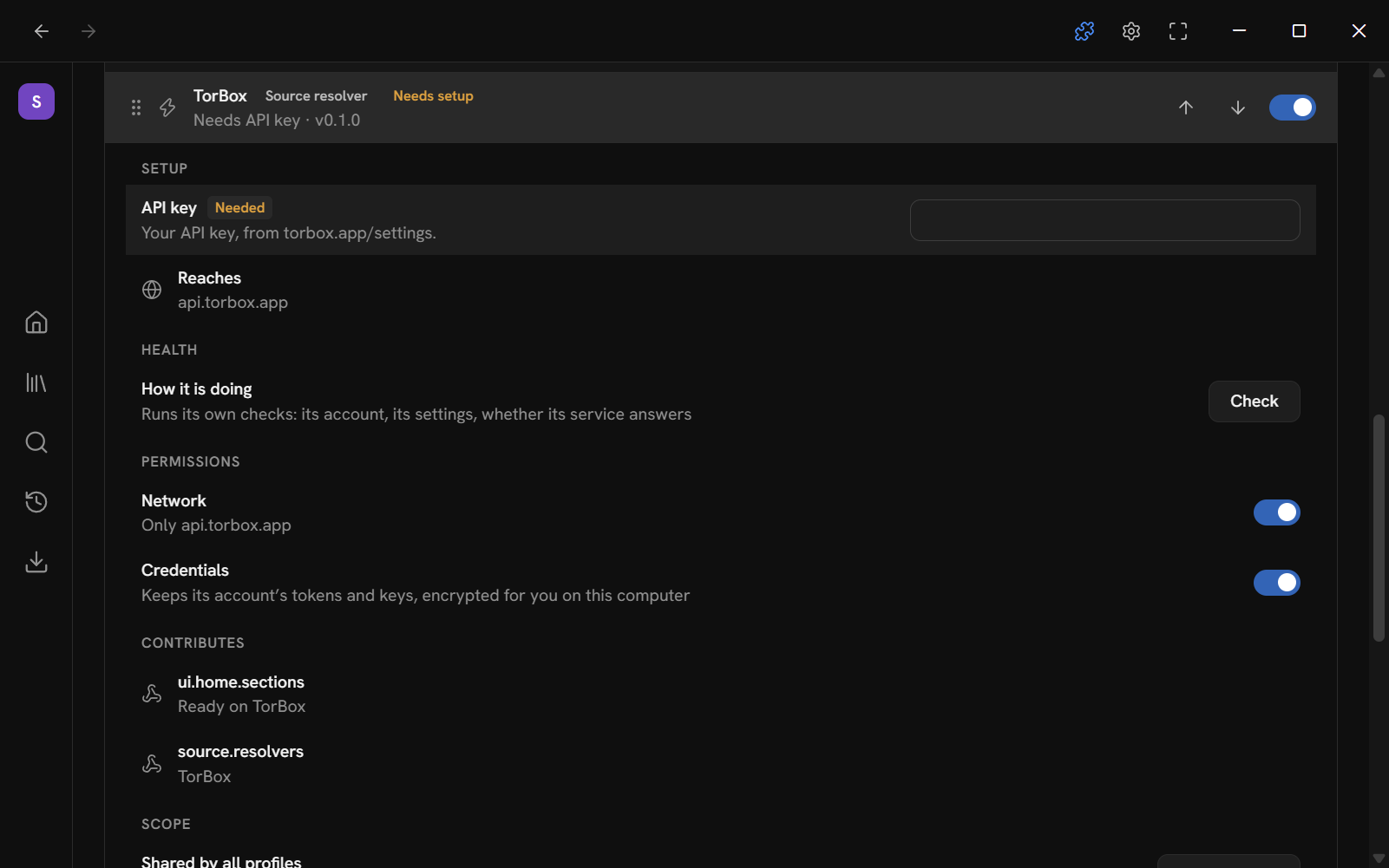
- Turn on TorBox on the Plugins page and open its row.
- Open your TorBox settings page (torbox.app/settings) and copy your API key. It is under API.
- Paste it into API key and press Save. The field then shows Set.
- Press Check under Health. It reads "Signed in as" and your account's email, with your plan: Free, Essential, Pro or Standard.
TorBox has no sign-in code. The key is the only thing it needs. Until you set it, the row says "Needs API key" and the plugin shows Needed.
Both plugins may reach only their own service (api.real-debrid.com and api.torbox.app). The Reaches row shows it.
Reading the sources
On a title's page, the source line shows the one that will play and a list of the others. In the player, the Sources button shows them too. Each source shows:
- The resolution and kind of file, such as "1080p · WEB-DL · H.264".
- The release's name and its seeders.
- Its size in GB, and where it comes from: the resolver, then the indexer or addon that found it, for example "TorBox · MyIndexer". A direct link reads "Direct" where the resolver would be.
- Badges.
| Badge | Meaning |
|---|---|
| Best match | The first source in the list. Automatic selection plays it unless you chose another. |
| Cached | The resolver has it ready. It plays at once. A direct link counts as cached. |
| May need a transfer | A release the resolver does not report as ready. The resolver says only when asked to play it, so it may be ready or may have to be fetched. |
| Downloaded | A file on this device. |
| A warning | Mantle expects trouble playing it here, and ranks it last. For example "Wrong colours here (Dolby Vision)", "Its sound may not play here (TrueHD)" or "In German, not English". |
What "cached" means
Mantle asks each resolver which releases it has ready. The two plugins answer differently:
- TorBox says which releases it has cached for everyone, and which your account already has ready.
- Real-Debrid does not say what it has cached for everyone. Mantle marks as cached only the releases already in your account.
A release a resolver has refused before is left out. Real-Debrid refuses releases a rights holder reported. TorBox refuses ones it will not take. Mantle remembers this.
To answer these questions, and to find a release that is already in your account, each plugin asks the account for its list of torrents. It asks at most every 20 seconds and keeps the list in memory only, never saved. Trying one source after another would otherwise ask over and over. A plugin asks again at once when it has added a torrent to your account or removed one.
Choosing which source plays
Settings → Playback → Source selection sets this.
- Automatic plays the best-ranked source and falls back to the next if it fails. A download does the same: if its source cannot start it (the file is gone, the link refused, the provider could not get it ready), it tries the next ranked one, and says why the first failed only when none works.
- Picker asks you each time.
The ranking has three rules. Drag them to change their order. The default is: Already cached on the provider, Highest resolution, Smallest file. A source found by a finder that ranks its own list, such as a Stremio addon, keeps its own order. Sources from a higher-priority finder come first. See Plugins.
If you use both Real-Debrid and TorBox, each release appears once for each. Pick the one you prefer, or let the ranking decide.
Playing
Press Play. The player shows what it is doing:
- "Finding the best source…" while the finders and resolvers answer and the first source is tried. If you pick a source yourself, it reads "Connecting to …" instead.
- If the resolver has the release ready, it plays.
- If not, the resolver fetches it. See below.
If a source fails, with Automatic selection the player says "Source 1 failed (the reason). Trying the next ranked source…" and tries the next. With Picker, or when none are left, it shows the list with the failed ones marked Failed. The list reads "… failed (the reason). Choose another source."
A source you pick while another plays that does not play is dropped, and the player says why (for a file its host no longer has: "did not play (the provider no longer has it)"). The one playing carries on.
A release can hold many files, as a season pack does. The resolver plays the file the finder named, else the file for the episode you asked for, else the largest video. It skips sample files.
While a release is fetched
When the account does not have a release yet, Mantle adds it to your account and the provider fetches it. The player shows:
- A line such as "Real-Debrid · MyIndexer is preparing 1080p WEB-DL · H.264…".
- A progress bar and the percentage.
- A line that says how long is left. This is a rough guess made from the percentage alone.
Mantle asks the provider how far it is every 3 seconds. When it is ready, the player starts the stream.
You have two choices while it waits:
| Button | What happens |
|---|---|
| Back, keep preparing | You leave the player. The provider goes on fetching. The top bar shows "Preparing 1", and Downloads lists the title as preparing. When it is ready, press Play there. |
| Cancel | You leave the player. Mantle tells the provider you no longer wait for it. If the plugin added the download to your account, it removes it again. A download that was already in your account stays. |
Mantle gives up on a release nobody shares:
- If the provider has not fetched the release's details after 45 seconds.
- If the download has not started after 90 seconds, with no progress and no seeders.
It then says "Real-Debrid could not get this release: nobody is sharing it." (or the TorBox version), takes the download out of your account (if the plugin added it), and moves to the next source.
If a provider says it is being asked too often, Mantle waits as long as the provider says, then asks again, up to three times. After that it says "Real-Debrid is busy (too many requests). Try again in a moment." (or the TorBox version).
When the server that has the file is busy
A server that holds a file may ask to be left alone for a while (it limits how often it is asked). While it does, Mantle says "The server is busy (it asked Mantle to slow down). Trying again in 8 s." over the picture, waits as long as the server asked (or 2 s, then 4, 8, up to a minute), and asks the same source again. It does not move to another source, which would be on the same server, and no source is marked as failed. After a minute of that it says so and offers Choose another source.
Mantle also asks a server for no more than it needs: each part of a file is read from it once (the picture and the sound of a film share the read), and the pictures of the seek bar's preview are read one at a time, at a set pace, and not at all while the server is refusing.
Switching source while playing
Open Sources in the player and pick another. If a stream is playing, it carries on while the new source is prepared ("Getting 1080p WEB-DL · H.264 ready…"). When the new one is ready, it takes over where you are. If it cannot be made ready, the one playing carries on and the player says why.
Ready in your account
Each plugin adds a shelf to Home with what your account has ready: Ready on Real-Debrid or Ready on TorBox, "In your account, plays instantly". Mantle reads the names of up to 30 releases in your account and finds their titles through a catalog plugin that supports search, such as Cinemeta. Titles it cannot find are left out. You can hide or reorder the shelf in Settings → General → Home layout.
When something goes wrong
The messages come in the provider's words, made plain. These are the common ones.
| Message | What to do |
|---|---|
| Your Real-Debrid account has too many downloads running. Remove some, then try again. | Remove some of the downloads in your account on Real-Debrid's site. |
| Your TorBox account has too many downloads running. Remove some, then try again. | The same, on TorBox. |
| TorBox queued this release: your account's download slots are full. Remove some, then try again. | The same. |
| Your Real-Debrid traffic is used up for now. | Wait, or check your plan. |
| Your Real-Debrid account has reached its fair-usage limit. | Wait. |
| Your TorBox account has reached its monthly limit. | Wait for the next month, or change your plan. |
| This release is too big for Real-Debrid. (For TorBox: "…for your TorBox plan".) | Pick a smaller source. |
| Real-Debrid will not take this release: a rights holder reported it. | Pick another source. Mantle will not offer this release again. |
| TorBox will not take this release. | Pick another source. Mantle will not offer this release again. |
| Your TorBox account is cooling down. Try again in a little while. | Wait. |
| TorBox has no servers free right now. Try again in a moment. | Wait and try again. |
| Your TorBox plan does not allow this. | Check your TorBox plan. |
| TorBox no longer has this download. | Try it again, or pick another source. |
| Real-Debrid signed you out. Sign in again. | Sign in again. |
| Your Real-Debrid account does not allow this (it may need premium) | Check your Real-Debrid plan. |
| TorBox did not take the API key. Check it in the plugin's settings. | Paste the key again. |
| Real-Debrid does not allow this network address (a VPN or proxy?) | Real-Debrid refuses the address Mantle connects from. Try without the VPN or proxy. |
| Real-Debrid is busy (too many requests). Try again in a moment. | Wait and try again. |
The Inspector's Log shows what each provider answered. The player's own hitches are kept in mantle-data/logs/mantle.log.
This page is made from docs/guide/debrid.md in the repository.