
Releasing and hosting
For the maintainer. This page is how a release is made and where Mantle is hosted: the channels and their Together services, the release key and CI's secrets, tagging, the site, the homepage and the wiki. What to do when a service is lost or full, and what is watched, is The Together service. It is not needed to work on Mantle: Building and testing is that page.
Channels and their services
Every build is of a channel, from its version (internal/build: Channel): a release's tag (0.3.0) is stable, a pre-release's (0.3.0-beta.1) beta, anything else (a commit between tags, uncommitted changes, go run, a test) dev. A release and a pre-release both reach Mantle Together's production service, and a build between them this computer's (internal/together: Backends). A beta is a newer build on the same account, so its channel says only which releases it is offered, and which web build it is:
| Channel | Together service | Its web build |
|---|---|---|
| stable | Production, Mantle's own: Supabase project ypwzfkkalpbkrhoegszw |
app.mantlevid.com |
| beta | Production, the same | app.mantlevid.com/beta/ |
| dev | This computer's: mk supabase, at http://127.0.0.1:54321 |
mk web -serve, at http://127.0.0.1:8017 |
Staging (Supabase project gmrvcajdizklgbxpstmz) is where a change to the schema is tried before production has it, and it is no build's service: CI brings it up to main's schema as migrations merge and runs its service tests there (they make accounts of their own and delete them), and MANTLE_TOGETHER=staging names it for a build between releases. No user's account is there, so its sign-in site (Supabase's site_url, which mk backend staging sets) is this computer's web build, http://127.0.0.1:8017/, the only Mantle that opens it: sign-in is by a code typed, and its emails carry no link to the site. (0.3.0-beta.1 reached it, and for a while the builds between 0.3.1 and 0.3.2 had betas keep a second account there, which a data folder crossed to by itself: #402 removed that. A folder that crossed opens signed in to production's account, and gives way to it if its beta ran last, as a state that is not of its sync state's moment does: internals.)
What keeps a beta safe on production: a change to the service is one the releases before it still work with (add, never break), and it reaches production before the beta that needs it is published (Releasing, step 4); a build is to leave alone a record of a kind it does not know (#390, which follows this change); and a beta's mistake with a household's records is what the restore page and the brake on mass deletion are for (internals).
A watch party's link opens its channel's web build. A release and a beta are at one service, so each joins the other's by its link or its code; a build of another service (dev's) is told the party is in another Mantle. A data folder belongs to the service it signed in to: a release and a beta open the same one in turn, with one sync state (together.json) and one session, and a build of any other service (dev's) leaves a folder signed in elsewhere alone, and Settings → Account says why, rather than mixing two services' profiles. On the site the beta is a Mantle of its own: its files, its service worker's cache and its tabs are apart from the release's, and it signs in to the same account with the email.
The schema is supabase/migrations, and the sign-in settings are supabase/config.toml (its emails supabase/templates). go run ./tools/mk supabase makes the dev service from them with a container engine, and go run ./tools/mk supabase migration up gives it a migration added since. Its emails are not sent: they arrive at its Mailpit, 127.0.0.1:54324. go run ./tools/mk backend staging brings staging up to them (CI does, once they are on main, before its service tests, and a tag does), and go run ./tools/mk backend stable (or beta, or with none named on a pre-release's tag: the same) production, which it says first, by name, before it asks anything of it ("mk: beta is production, the service every release and pre-release reaches"; run it with -plan to see what it would change): first the migrations it has not had, each applied whole or not at all and recorded as the CLI records them, then the settings, with the channel's web build as its site. -check changes nothing, and fails if anything would change; -plan changes nothing either and says what would, failing only if the service cannot be brought up (the workflows use it to report). Each migration is recorded with the SHA-256 of its file (a column checksum beside the CLI's own in supabase_migrations.schema_migrations), and one that was edited after it was applied is refused rather than skipped: a version that was run is not run again, so an edit reaches no service. Change the schema in a new migration. Production is brought up only if it has had no migration the repository lacks and none as another file than the repository's now is (it has not drifted), and staging has had every one it is to be given as the very file (the checksums are compared, not only the versions): else mk backend stable stops, -check and -plan too, and says which. A migration staging has had with no checksum recorded (the Supabase CLI's own record, or one applied before mk recorded them: #345's, say, which CI puts on staging as it merges) cannot be compared. That is every migration staging ran before mk recorded checksums, whether or not #345's, and production's promotion is refused for each that production lacks, naming them all, until it is recorded. To see what staging has had, go run ./tools/mk backend staging -plan (or -check) lists each migration with the checksum staging recorded for it beside the file's: "had as this file" is compared, "had as another file" is a migration edited since it ran, and "no checksum recorded" says nothing of what was run (the checksums can also be read at staging with select version, checksum from supabase_migrations.schema_migrations). If staging ran the repository's files, say so with go run ./tools/mk backend staging -record, which records the repository's checksum for each such migration, prints each it records, and touches nothing else: it is the owner's word, and nothing checks it, so a migration edited after staging ran it is adopted as if tried, and detection starts only from the record. Production's own migrations have no checksum (they were run before mk recorded any, and -record is not for production): its drift check is by version alone for those, so an edit to an old migration is not seen at production; only a migration mk applies from now on is recorded and compared. It needs a Supabase access token (supabase.com → Account → Access Tokens), asked for here rather than typed into the command:
$env:SUPABASE_ACCESS_TOKEN = Read-Host -MaskInput "Supabase token"
go run ./tools/mk backend staging
A migration goes to staging while it is worked on (by hand, as above; CI brings staging up to it once it is on main, and a tag does), and to production only with a release or a pre-release that needs it, as its own step when that one is published (Releasing, step 4), once it is on staging as that very file (CI brings staging up to the migrations on main as they merge, and a tag does too, so a migration is on staging from its merge: the check says it was applied there, and CI's service tests ran on it). Change the schema only in ways that the release before it still works with: stable users update at their own pace, and a pre-release's migration is on production while every release before it still runs.
A project's emails an hour are one count for the whole project (auth.rate_limit.email_sent, 30), not an address's or a network's. A sign-in code for a made-up address makes an account, so enough of them stopped every real sign-in from getting its email. The app therefore asks the service for a sign-up before it asks Auth for a code (Client.SendCode calls public.ask_sign_up(email), which anon may run and which never refuses: it keeps a ticket for the email, with the network it asked from, for limits.ticket_for, 15 minutes), and Supabase Auth asks a function of the schema before it makes an account (auth.hook.before_user_created in supabase/config.toml, public.before_signup), which runs for new accounts alone. It needs a fresh ticket (else 403, "Update Mantle": a build that does not ask first makes no new account), counts the accounts already made from the ticket's network (the rows of sign_ups, which deleting an account does not take away) and refuses the eleventh an hour (the row limits.sign_ups: ten, so a shared address, such as a mobile carrier's or a campus's, takes a few households; the rest are told to try later or to sign in on a device that has an account), then spends the ticket. An existing account is never refused. The network is the address in cf-connecting-ip, which the hosted gateway's edge (Cloudflare) sets and overwrites, and PostgREST gives the function in request.headers: not the address Auth gives its hook (metadata.ip_address), which Auth reads from the first entry of X-Forwarded-For, a header a client sets. With no such header (this computer's service has no edge) every request is one shared bucket. The salt of the hashes is made again every hour and the one before it is kept for the tickets asked with it, so a ticket outlives it. What this tells a caller: a code asked for from Auth directly, with no ticket, is refused (403) for a new address and not for one that has an account, so such a call tells the two apart (as one the network's limit refused does, to a new address); the app's own never does. mk backend brings the hook's setting with the others, after the migrations (the function is there first). A device asking to join an account makes no account of an email, and a code asked for again is Supabase's own once-a-minute limit (auth.email.max_frequency). A network that cannot make accounts is told so (429) and nothing is sent. What it does not stop: many networks at once, or many real addresses (each at most once a minute); the mail plan's own hourly and daily limits do. Raise email_sent only to those. An address is confirmed by its code, not by being asked for one (auth.email.enable_confirmations = true, which mk backend pushes to a hosted project as mailer_autoconfirm: false and reads back in -check), so an address asked for and never used has no session, which is what housekeeping looks for to remove it; with autoconfirm on, a code asked for would sign the account in and no made-up address would ever look unused. What a loop of changes by a friend or editor costs is a round on each device of the account at most every 30 s (one round is several requests; a person's own action here is never held, and the news cannot tell an invite from a push, so a friend's invite can wait that long behind a loop); the service still writes a news row and sends a Realtime event for each change, which nothing limits.
Until a project has a mail service of its own (its Authentication → SMTP settings), Supabase sends its own emails: they carry a sign-in link rather than the code the app asks for, two an hour at most, and Supabase does not let their templates change. mk backend leaves the templates alone until then, and says so. mk backend stable|staging -mail gives a project its mail service: Resend's SMTP, sending from noreply@mantlevid.com (a domain verified at Resend), with a Resend key that only sends from it as its password (MANTLE_SMTP_PASSWORD); then the repository's emails and their limit (auth.rate_limit.email_sent, an hour). It changes nothing else, so it can be done before a release brings the rest. Both projects have it.
Releasing
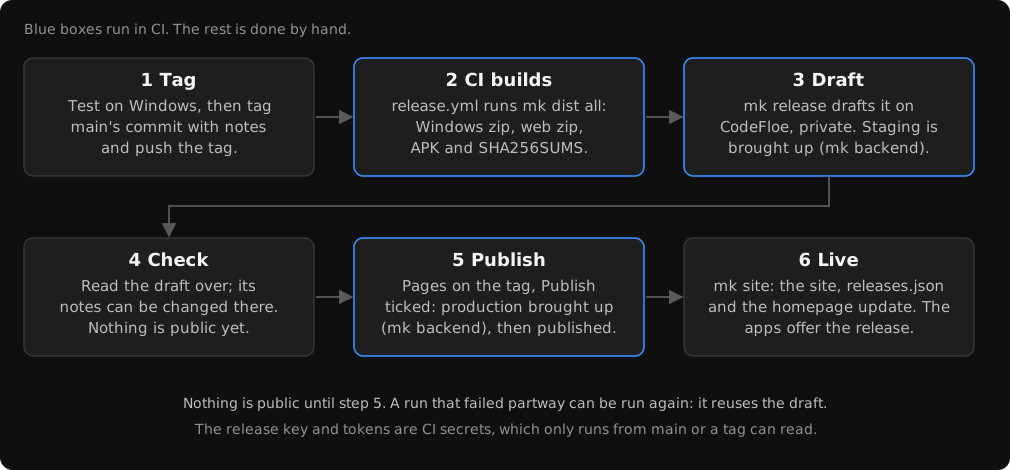
A release is a tag, v<version> (v0.3.0; a pre-release's has more after a hyphen, v0.3.0-beta.1), and its files on the repository's Releases on CodeFloe. Pushing the tag makes it: CI builds the files and drafts the release (its code was tested on its pull request, and on Windows in step 1). It can be made on this computer too (below). The commands are PowerShell's, run from the repository's folder.
Once: the Android release key. A phone updates the app only from one signed with the same key. Make it once, keep the keystore and its password safe for as long as the app is made (with them lost, every phone must uninstall the app to take the next), and keep the keystore out of the repository:
New-Item -ItemType Directory -Force "$HOME\mantle-keys"
& "$env:LOCALAPPDATA\Android\jdk-17.0.20+8\bin\keytool.exe" -genkeypair -keystore "$HOME\mantle-keys\mantle-release.keystore" -alias mantle -keyalg RSA -keysize 4096 -validity 36500 -dname "CN=Mantle"
keytool asks for the password twice.
Once: the key in CI's secrets. In the repository's Settings → Actions → Secrets, add ANDROID_KEYSTORE, the keystore as base64, which this copies:
[Convert]::ToBase64String([IO.File]::ReadAllBytes("$HOME\mantle-keys\mantle-release.keystore")) | Set-Clipboard
Then ANDROID_KEYSTORE_PASSWORD, and ANDROID_KEY_ALIAS and ANDROID_KEY_PASSWORD if they differ from mantle and the keystore's password. FORGEJO_TOKEN is a CodeFloe token that may write the repository (Settings → Applications → Generate new token, repository read and write): release.yml drafts the release with it (mk release), and pages.yml publishes it (mk release -publish). With SUPABASE_ACCESS_TOKEN there too, the release workflow brings staging up to the tag's schema and settings once its files are built and the release is drafted (mk backend staging), and says what the tag will change at production (mk backend stable -plan: nothing is changed, and the step fails if production cannot be brought up to it as things are), for a release and a pre-release alike. Production is brought up as either is published, by Pages (step 4), as a step of its own. Without the token, the tag workflow (release.yml) warns and goes on, and Pages run on a tag fails before it publishes anything: nothing else stops a release being published to a production it was not brought up to. The release's own steps stop at once without ANDROID_KEYSTORE or ANDROID_KEYSTORE_PASSWORD: a tag's build has no fallback password.
One Supabase token reaches both projects. A personal access token (Account, Access Tokens) is the account's: it reaches every project the account can, so the staging-only jobs (the service tests on every push to main that changes supabase/, and a tag's staging step) hold a token that can run mk backend stable. No narrower token is known to be offered (check the account's page: a token for one project would be the thing). What can be done: staging's jobs may use another account's token, one that is a member of staging's organisation alone (move staging to an organisation of its own, and make that account), set as SUPABASE_STAGING_ACCESS_TOKEN; tests.yml and the staging step of release.yml read it first, and fall back to SUPABASE_ACCESS_TOKEN, so nothing changes until it is set. Until then the exposure is as for any secret here: it reaches only runs from main or a tag (and the Service workflow's usage step, which reads production's database size and active-user count and staging's status: .forgejo/workflows/service.yml), appears in no step's output (it is in a step's environment, and mk's errors print Supabase's answer, never the header), and a change that reaches main can use it on production.
Once: the feed's signing key. The apps offer an update only if the feed of releases is signed by Mantle's key (The feed of releases). Make the key pair once, and keep the private key as safe as the Android keystore (with it lost, the way out is Replacing the key, which costs a release):
go run ./tools/mk release key
It prints the pair. Put the private key in the repository's secrets as MANTLE_FEED_KEY (Settings → Actions → Secrets; only the Pages workflow reads it, as it is the one job that writes the feed), or keep it off CI (below). Put the public key in internal/feedsig/feedsig.go as the one in Public, and release a build with it: that release is the first to have the key, so it must be tagged after the key is in. The release workflow checks a key is built in (mk release key built) before its long build, and mk release refuses to draft a release from a build with none, saying to commit the public key and set the secret before tagging (a tag made too early is deleted and made again); and Pages refuses to publish with a MANTLE_FEED_KEY that is missing or not the private key of one built in (mk release key check, run first), so neither leaves a release with a feed the apps would refuse.
Secrets reach only what runs from main or a tag: no workflow run for a pull request has one, and the ones run by hand (Release, Pages, Homepage, Wiki) are refused from any other branch, or, for Release, are a trial that uses none. A branch's own workflow file could still ask for them, so only people the repository trusts with its code may have write access to it, and CodeFloe's branch and tag protections should keep main and v* to the owner.
MANTLE_TOGETHER_STAGING_ADMIN, staging's secret key (supabase.com → the staging project → Project Settings → API Keys), has CI run Together's service tests against it as well (.forgejo/workflows/tests.yml: its own job, on a push to main that changes supabase/, internal/together/ or mk backend, so never for a pull request, which gets no secret), after bringing it up to main's schema with SUPABASE_ACCESS_TOKEN; they make accounts of their own and delete them after. Without it, they are skipped with a warning. A migration a pull request adds is therefore tried on staging once it is merged; before, go run ./tools/mk supabase and mk test try it on a local Supabase (a plain Postgres cannot stand in: the schema uses Supabase's own auth schema and roles).
Each release:
-
On Windows, test what is to be released. CI tests on Linux, so this is where the code only Windows builds is tested:
go run ./tools/mk testIf it has a migration staging has not had, the release workflow brings staging up to it (with
SUPABASE_ACCESS_TOKENamong the secrets; else bring it up first by hand:go run ./tools/mk backend staging); a migration must be on staging as that very file first (CI puts main's there as they merge, and a tag does), or production refuses it (see Channels and their services). -
Tag
main's commit (the one tested in step 1), with its notes, and push the tag, dated in UTC as every commit here is.git tag -aopens your editor: the first line names the release (Mantle 0.3.0), then a blank line, then the notes, in Markdown, for whoever uses Mantle: what is new, what changed and what was fixed (#12links issue 12). Git takes a line starting with#for a comment and drops it, so the command below has comments start with;instead, and Markdown's headings (### New) stay. The app shows the notes when it offers the release and after updating to it, as the release's page and the feed do: one text, the release's as published.$env:TZ = "UTC" git -c core.commentChar=";" tag -a v0.3.0 git push origin v0.3.0 -
.forgejo/workflows/release.ymlbuilds the tag's files withmk dist all(mantle-0.3.0-windows-x64.zip,-web.zip,-android.apkandSHA256SUMS.txt), drafts the release with the files (mk release), its notes the tag's (or, a tag without any, the commits since the previous release), and then brings staging up to the tag's schema and settings (mk backend staging, withSUPABASE_STAGING_ACCESS_TOKENorSUPABASE_ACCESS_TOKENset), and says what production will change when the release is published (mk backend stable -plan), and the step fails, with the reason in the log, if production cannot be brought up to it as things are (drifted, staging lacking a migration or having it as another file, an API error), so that is known now and not when the release is to be published. A pre-release's tag drafts a pre-release. The release key is decoded from the secret into a file that is removed once the files are built. If a service step fails, the draft stays (private): fix it, rungo run ./tools/mk backend stagingby hand, and publish; a rerun of the workflow fails drafting only a published release, and reuses a draft (attaching its missing files). -
Read the draft over on the Releases page (its notes can be changed there too: what is published is what the apps show). Nothing is public until it is published. Publish it by running Pages on its tag with Publish ticked (Actions → Pages → Run workflow, the tag as the branch; Pages runs from
mainor av*tag only, and checks a tag is onmain; frommainit puts up the homepage alone, as the site is a release's): for a release or a pre-release, it first checks the draft exists (mk release -check), then brings production up to the release's schema and settings:mk backend stable -plansays what will change (it is in the run's log), thenmk backend stablemakes the change, and stops before anything is published if production has drifted or staging has not had a migration yet (as that file), so a release never reaches a service it does not work with. WithoutSUPABASE_ACCESS_TOKENit fails there, publishing nothing. It then publishes the draft (mk release -publish) and puts its web build on the site with the feed of releases (.forgejo/workflows/pages.yml), so the apps offer it: a release's at the site's root, a pre-release's atbeta/. If the production step fails, nothing is published and the site is as it was: fix what it says and run Pages again (the draft is reused; each migration is applied whole or not at all and one that was applied is skipped, so a step that stopped partway is finished by the next run; the migrations applied meanwhile are safe for the release before it, by the compatibility rule above). Forgejo starts no workflow when a draft is published on the Releases page, so a release published there leaves the site, and production, as they were: bring production up first by hand (go run ./tools/mk backend stable), and run Pages on its tag then, without Publish. Without Publish, on a tag, Pages puts the site up only if the release is published (mk siterefuses a draft's web build) and production is the release's already (mk backend stable -checkmust pass): the web build of a release never goes live against a production it was not brought up to. A run ofmk releasethat failed partway can be run again: it reuses the draft: it attaches the files it lacks and replaces any whose contents changed since (checked by size, then SHA-256).
mk dist all checks the commit is at the tag with nothing changed, so every file carries the tag's version. Without MANTLE_RELEASE it builds a trial's files, named dev. Run by hand (Actions → Release → Run workflow), the release workflow is such a trial, from any branch: the files as the run's artifacts, signed with a key made for the run, and no release. A trial uses no secret.
On this computer instead. With the Android kit (building) and a token of yours that may write the repository (CodeFloe: Settings → Applications → Generate new token, with repository access read and write), after steps 1 and 2:
$env:MANTLE_RELEASE = "v0.3.0"
$env:MANTLE_ANDROID_KEYSTORE = "$HOME\mantle-keys\mantle-release.keystore"
$env:MANTLE_ANDROID_KEYSTORE_PASSWORD = Read-Host -MaskInput "Keystore password"
$env:MANTLE_FORGE_TOKEN = Read-Host -MaskInput "CodeFloe token"
go run ./tools/mk dist all
go run ./tools/mk release
The password and the token are asked for, not typed into the commands. Once the release is published, go run ./tools/mk site puts its web build on the site, signing the feed with the key in MANTLE_FEED_KEY ($env:MANTLE_FEED_KEY = Read-Host -MaskInput "Feed key" first).
The desktop app is not code-signed, so Windows SmartScreen asks before the first run of a downloaded copy. SHA256SUMS.txt says each download is the release's. The release has the site too, as mantle-<version>-web.zip, to serve from anywhere.
The site
The web build is at app.mantlevid.com, and at sotherdev.codefloe.page/mantle/. CodeFloe serves the repository's pages branch there (Settings → Pages, with the domain's DNS record app a CNAME to sotherdev.codefloe.page). The latest pre-release's web build is at app.mantlevid.com/beta/, named Mantle Beta, and reaches production's service, as the release's does.
go run ./tools/mk site builds the web build of the release HEAD is at (its tag, nothing changed: anything else it refuses, and a release that is not published yet, as its web build runs against production's service). A release's replaces the site's root, all but beta/. A pre-release's replaces beta/ alone. The feed of releases, and the Android app's links (.well-known/assetlinks.json, with the release key's fingerprint), go at the root either way. The branch is then that one commit, pushed to origin. pages.yml runs it when Pages is run on a release's tag (Actions → Pages → Run workflow, from the tag): with Publish ticked, as in Releasing's step 4, it publishes the draft first; without, it puts that release's site up again.
A browser keeps the web build's data (profiles, plugins, keys) under the address it was opened from, so the site stays at app.mantlevid.com wherever the repository moves: the domain's record is pointed at the new host.
The feed of releases
releases.json beside the site (https://app.mantlevid.com/releases.json) is what the apps read to offer a newer Mantle (internal/core/updates.go). mk site writes it from the repository's published releases on CodeFloe, newest first: each one's version, date, notes (as published), page, and its downloads with their SHA-256 from its SHA256SUMS.txt (a release with none is left out, as its downloads cannot be checked). An app downloads its file from the release on CodeFloe, at the address the feed gives, and checks it against that sum (and its size) before it installs it, streaming it to disk as it comes. The feed is read over https only (or http on the same computer, to try one out). Its address is a setting (Settings → Data and storage → About), so a copy hosted elsewhere can read its own.
The feed is signed. The sums are what the downloads are checked against, so whoever can change the feed can have every install run their program: a hijacked host, or its TLS, would be enough. So mk site signs the feed with an ed25519 key, internal/feedsig's (Go's crypto/ed25519), and publishes the signature beside it as releases.json.sig. The signature is of the feed's exact bytes, so nothing is parsed or put in a canonical form before it is checked:
signed message    = "mantle-feed-v1\n" + the bytes of releases.json
releases.json.sig = "mantle-feed-v1 " + base64(signature) + "\n"
The first line of the message is the signature's domain (a signature of this feed is not one of anything else), and its word the format. The feed may grow fields without any change here; a new way of signing is a new word, which builds that do not know it refuse.
The apps' side, in readFeed: when the feed is the default one, its signature is fetched and checked against the public keys built in (feedsig.Keys). A feed whose signature is missing, is not of those bytes, or is of another key is refused, after the pair is fetched once more (a publish or a cache can give the new feed with the old signature): nothing is offered from it, the Settings → About says "Could not look: the releases feed could not be verified as Mantle's…", and the log has a line saying why (what was read before stays, as for any failed look). An update's file is only downloaded from a release read from a signed feed. A custom feed (one typed in the setting) is outside the signing guarantee: it is read as it always was, unsigned, and Settings → About labels it "not signed", since nothing says it is Mantle's. Its update is shown, but installing it asks first, naming the feed ("Install from a feed that is not signed?"), and the install request must carry that feed's address (core.ErrConfirmFeed otherwise). That is a guard for the app's page, not a security boundary: it stops a stale page, or a feed changed between the dialog and the install, or a mistaken click, and nothing more, since anything that can call the local API can set the feed and name it in the install itself. What keeps others from the API is its door, the server's access code and session with its cross-origin and host checks (internal/server/gate.go), and the desktop app's own window; the custom feed is a way the user's own device can be pointed at code they chose, and is outside the signing guarantee. Whether a release was read from a signed feed (keptUpdates.Verified) is never saved: after a restart a download waits for the first look at the signed feed, so a saved state cannot vouch for itself. What is signed is the feed, so an attacker who has the host can still hold back a newer feed by serving an older signed one (an update is withheld, or an older release than the newest, though still newer than the app, is the one offered; the apps never go back to an older version than they run), but cannot make a release of their own. The signed feed has no counter or expiry, which is left as it is: a replay needs the host, and an expiry would stop every app looking for updates whenever a release was late, so it is not worth that cost yet. A new format word could add one.
Builds from before signing ignore releases.json.sig, and read the feed as before, so publishing it breaks none. The first build with the key refuses an unsigned default feed, and accepts the first signed one. The release that has the key is offered by a feed that is signed, to apps from before, which ignore the signature.
Replacing the key. feedsig.Public is a list: a signature by any of its keys is accepted, and the first is the one in use. Lost, leaked or retired, a key is replaced so: make a new pair (mk release key), add its public key to the list after the old (Public = {old, new}), and release a build with both, signed with the old key. Once the apps most installs run are that build or later, sign with the new key (the secret MANTLE_FEED_KEY, or the offline key), and in the next build drop the old public key from the list. An app that never ran that build holds only the old key, so it refuses a feed signed with the new one, and is updated by hand once (the downloads page). That is also what a lost key with no other in the list costs: every app refuses the feed until it is installed by hand again, from a build with a new key. To avoid it, put a spare key's public half in the list from the start (a second mk release key, its private half kept off CI in a safe place): a lost key is then replaced by signing with the spare.
Signing off CI
CI already builds the files, so the key in its secrets does not widen what a hijacked CI can do (it could ship its own binaries anyway); the key is there to answer a hijacked feed host. If you would rather it never be on CI, keep it on your computer, and publish the site from there, after the release is published (Releasing, on this computer): $env:MANTLE_FEED_KEY = Read-Host -MaskInput "Feed key", then go run ./tools/mk site from the tag. Do not run Pages on the tag (it has no key, and stops at mk release key check, publishing nothing), and publish the draft by hand on the Releases page. Pages is also what refreshes the homepage's downloads and changelog after a release (its last step), so run Homepage by hand then (Actions → Homepage → Run workflow). Either way the key is only ever in the environment of the one command that signs.
The homepage
The homepage, for mantlevid.com, is made from home/ by go run ./tools/mk home into out/home/. It is the page itself, the changelog, and these docs as pages of it:
- The pages are Go templates (
page.htmlaround each;index.html,changelog.html,doc.html), withhome.cssandhome.js. What the homepage says, its showcase and its features arehome.json. The app's fonts come from its packages, its brand fromfrontend/src/brand, and its themes fromfrontend/src/styles/themes.json. - The downloads, betas and changelog are the releases published on CodeFloe, read as the feed of releases is. The newest release is the one to download; a pre-release newer than it is the beta; every other is under Older releases. Each one's notes are on the changelog, without their downloads.
- The docs are the pages Docs (
docs/README.md) lists, in its order and under its headings, each atdocs/and its title in lower case, words joined by hyphens (docs/real-debrid-and-torbox/). Links between them are to their pages, their pictures are copied beside them, and anything else in the repository is linked on CodeFloe. - The screenshots,
home/shots/, are taken bygo run ./tools/mk shots. It runs the server build with the built-in sample (made-up titles, profiles and providers, nobody's own) in a headless Chromium, as the Windows app draws itself and as a phone shows it (home/shots.mjssays which screens, and the steps to each). It keeps the whole screens, the parts of them the homepage shows up close (and where each is on its screen,parts.json), and Home in each theme. Take them again as the app changes, and commit them.
go run ./tools/mk home -serve serves it at http://127.0.0.1:8018, made again from its sources as they change.
Where it is. It is not this repository's site: CodeFloe serves all of a repository's domains from its one Pages site, and this repository's is app.mantlevid.com. So the homepage is another repository's site, its pages branch, which go run ./tools/mk home -publish replaces with one commit of out/home/. To set it up:
- Make the repository (
sotherdev/mantlevid.com, say). - Make an SSH key for it (
ssh-keygen -t ed25519 -N "" -f homepage) and add its public half to that repository as a deploy key with write access (Settings → Deploy keys). In this repository's Actions settings, add the variableHOMEPAGE_REPO, that repository's SSH address (ssh://git@codefloe.com/sotherdev/mantlevid.com.git), and the secretHOMEPAGE_KEY, the private half. The key can push to that repository and nothing else. mk trusts only CodeFloe's own host key (homeHostintools/mk/home.go). - Run Homepage once (Actions → Homepage → Run workflow), which makes the
pagesbranch. - In that repository's Settings → Pages, turn Pages on, publishing the
pagesbranch, withmantlevid.comas its primary domain. - Point the domain at it, as
appis pointed at this repository's:mantlevid.comis an apex, where a CNAME is not allowed, so it is an ALIAS or ANAME record (Cloudflare's flattened CNAME) tosotherdev.codefloe.page, or CodeFloe's A and AAAA addresses (CodeFloe's docs, Pages, Custom domains).
.forgejo/workflows/homepage.yml then publishes it whenever a push to main changes what it is made from, and pages.yml does as a release is published (from main, not the tag). Without HOMEPAGE_REPO neither runs it, and Homepage run by hand does nothing from a branch but main.
The wiki
The repository's wiki is these docs, made from docs/ (their source) by go run ./tools/mk wiki: docs/README.md as Home, every other page by its title, the links between them as the wiki's, and pictures and other files linked from the repository on CodeFloe. A sidebar lists the pages in the order Home links them, and each page says where it is made from. mk writes the pages to out/wiki/ and pushes them as the wiki's one commit, replacing what it had, so the docs are where pages are edited. .forgejo/workflows/wiki.yml runs it whenever a push to main changes docs/, and by hand from main alone.
This page is made from docs/dev/releasing.md in the repository.