
Sharing a setup
This page is for moving a setup to another device or sharing it with a friend, as a code or a file. A setup is the way you have Mantle arranged: which plugins are on and how they are set up, your settings, and your lists. You pick what to share item by item, and whoever brings it in picks again what to take. The page covers what a setup holds and never holds, how to share one, how to bring one in, and how plugins from elsewhere are installed.
What a setup holds
You pick from four groups.
| Group | What you pick | What it holds |
|---|---|---|
| Plugins | Each plugin | Whether it is on, and its settings that are not secret. For a plugin that did not come with Mantle, where it installs from. |
| Settings | General, Playback, Appearance, Shortcuts | General: what Mantle opens to, Home's shelves, whose downloads show. Playback: sources, audio, subtitles, up next and the player. Appearance: theme, sizes, spoilers and motion. Shortcuts: keys changed, and the controller. |
| Lists | Each list | Its titles. |
| Smart lists | Each smart list | Its rules. |
A group with nothing in it is not shown. Two lists of one name are shared as "Name" and "Name (2)", so each can be picked.
For a plugin you pick that came from a repository you added, the repository's name and link travel too, so the other side can add it. A repository is never shared for a plugin you leave out.
Keys, only if you include them
Sign-ins and their tokens are never in a setup, nor any key a plugin keeps to itself (Real-Debrid's, whose account streams from one place at a time). A key its provider lets you use from more than one place (TorBox's API key, a Jellyfin password, a Torznab feed's key, a TMDB key), and a Stremio addon's link as you set it up, can go in, but only if you include it:
- Under each plugin you pick that has one, a row reads "Include its API key" (or password, or link as set up), with "Anyone with the code can use it". It starts unticked. Tick it to include the key.
- With a key included, the code says so: "This code holds TorBox's API key. Anyone with the code can use it: share it only with people you trust." Untick the plugin and its key goes with it.
Otherwise, whoever brings the setup in is asked for their own keys and sign-ins.
Links that may hold a key are not shared unless you include them either:
- A plugin's install link, a repository's link, or an address in a plugin's settings that has a user name, a query (the part after
?) or a fragment (the part after#) is left out. A plugin with no link left is shared without one. The other side can use it only if it has the plugin already, or the plugin comes with Mantle. - A Stremio addon you set up on its own site is shared as that site only, unless you include its link as set up. Torrentio is an example: the key for your debrid account is in its link's path. Whoever brings the setup in sets the addon up again on its site with their own account, and pastes the link the site gives them.
- If an addon's link has the addon SDK's JSON setup in it, that part is taken out of the link. The addon's settings that are not secret travel as settings.
- An address setting that holds a link like these is not shared.
Your library, favourites, watch progress, history, profiles, download folders and downloads are not in a setup either. To move those, use Export and Import (see the end of this page).
What to check before you share
- Each plugin's line says what it sets, with the host of any address, for example "sets server at den.lan:8096 and user name". Plugin settings that are not secret are included, such as a Jellyfin server's address and user name. Untick a plugin to leave it out.
- Outside Stremio addon links, Mantle looks for a user name, a
?part and a#part in an address. It cannot tell a key written into the rest of an address from the address. Keep keys out of addresses. - A code or file holds your profile's name, which shows as "Shared from" on the other side.
Share your setup
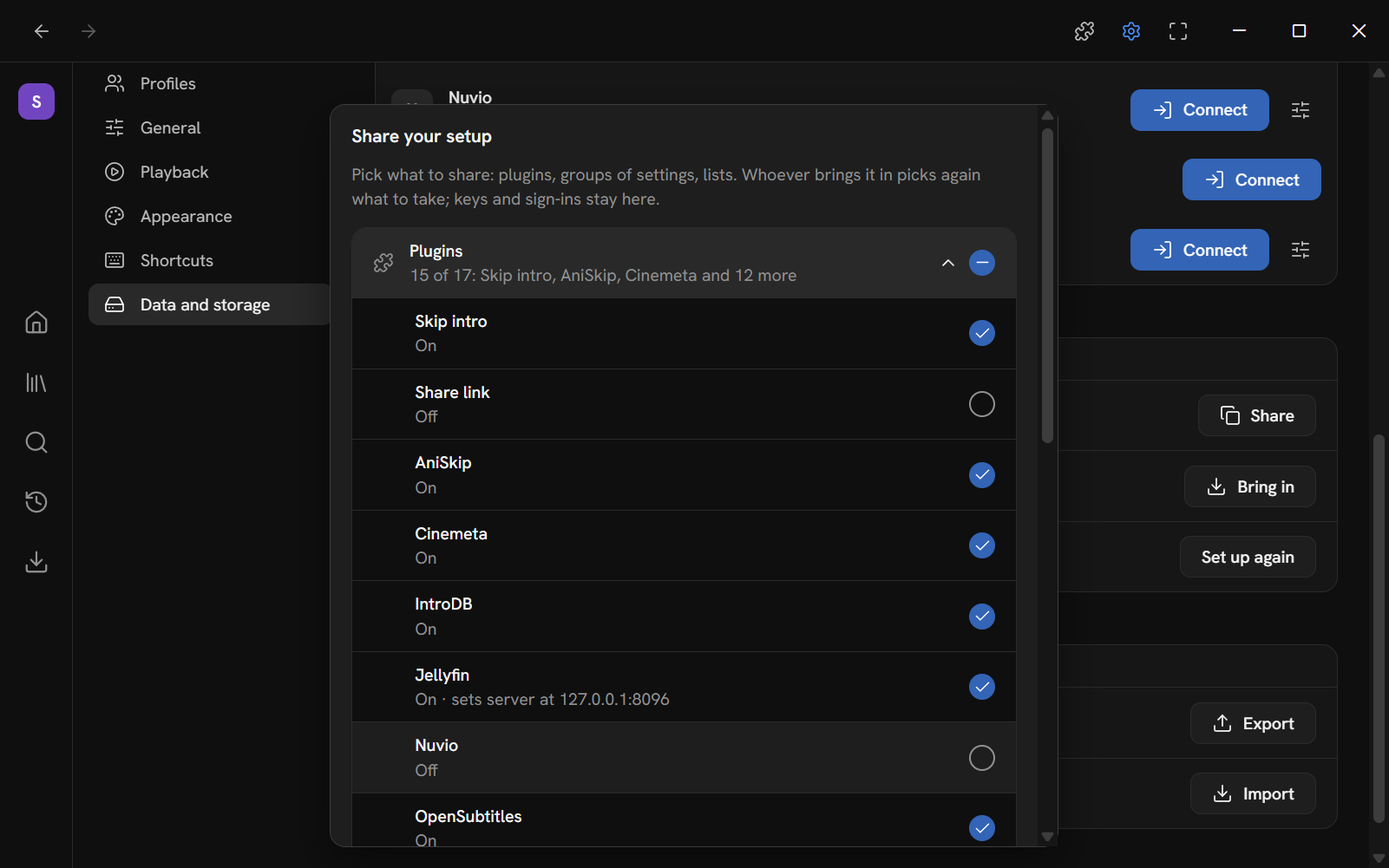
- Open Settings → Data and storage. Find the Share your setup group.
- Press Share.
- Pick what to share. Everything is picked at first.
- Press Copy code, or Save to a file. Both are off while nothing is picked.
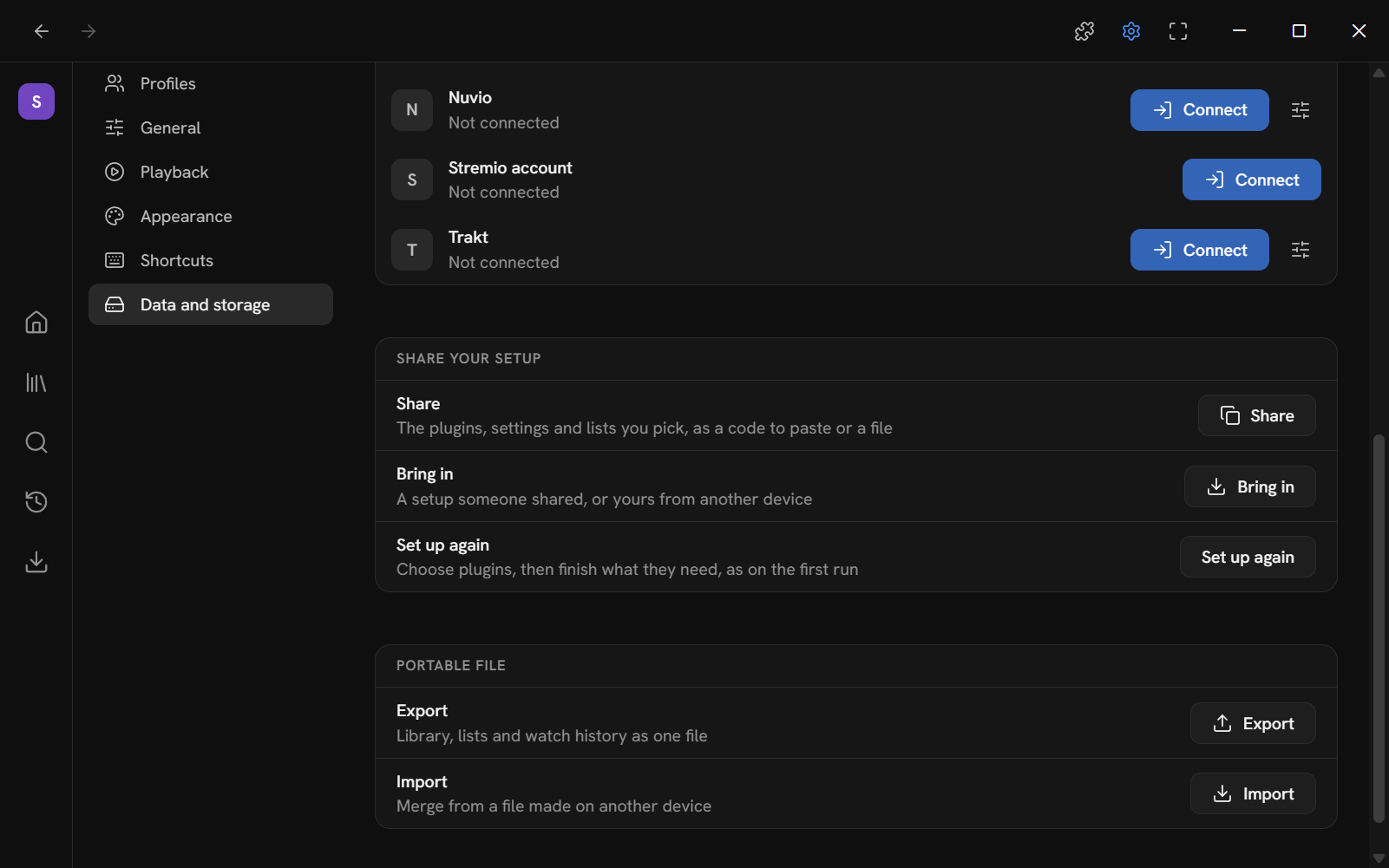
The group has three rows: Share ("The plugins, settings and lists you pick, as a code to paste or a file"), Bring in ("A setup someone shared, or yours from another device") and Set up again ("Choose plugins, then finish what they need, as on the first run").
Picking
The window has one row for each group: Plugins, Settings, Lists and Smart lists. A row says how much of its group is picked: "All 17: Cinemeta, TVmaze, Jellyfin and 14 more", "5 of 17: …" or "None of 3".
- Press a row to open it and see each thing in it. Each is a checkbox. Press it, or move to it and press Space.
- The checkbox at the end of the row ("Include all plugins") takes or leaves the whole group. When only some are picked, it reads as mixed.
- A plugin's line says whether it is on or off and what it sets, for example "Off · sets server at den.lan:8096 and user name". A list's line says how many titles it has. A setting group's line says what it holds.
Changing the pick clears the code you copied, because it was of the old pick.
Codes and files
| Code | File | |
|---|---|---|
| What it is | Text that starts with mantle1:. |
A .json file. |
| How to share it | Paste it into a chat, an email or a note. | Send the file. |
| How you make it | Copy code. Mantle copies it and shows it in a box. | Save to a file. |
| Brought in with | Pasting it. | Open a setup file. |
Both hold the same thing. A code is the setup's data, compressed, written as text. Spaces and line breaks that a chat adds to a long code do not matter.
Copy code puts the code on your clipboard and says "Setup code copied". Over plain http:// on a network, a browser does not let a page use the clipboard, so Mantle copies the code as a selection instead. If that fails too, the message reads "Copy the code below", and the code is in the box to copy by hand.
Save to a file names the file mantle-setup-, your profile's name in lower case and the date. What happens next depends on where you run Mantle:
| Where | What happens |
|---|---|
| The desktop app | The file is written to mantle-data/exports. Mantle says where: "Saved to …". |
| A browser | The browser downloads it, to where it keeps downloads. Mantle says "Your setup is downloading". |
| The Android app | The phone's own Save dialog asks where to put it. |
Bring a setup in
You can bring a setup in during the first run (the Bring a setup step), or any time from Settings → Data and storage → Share your setup → Bring in.
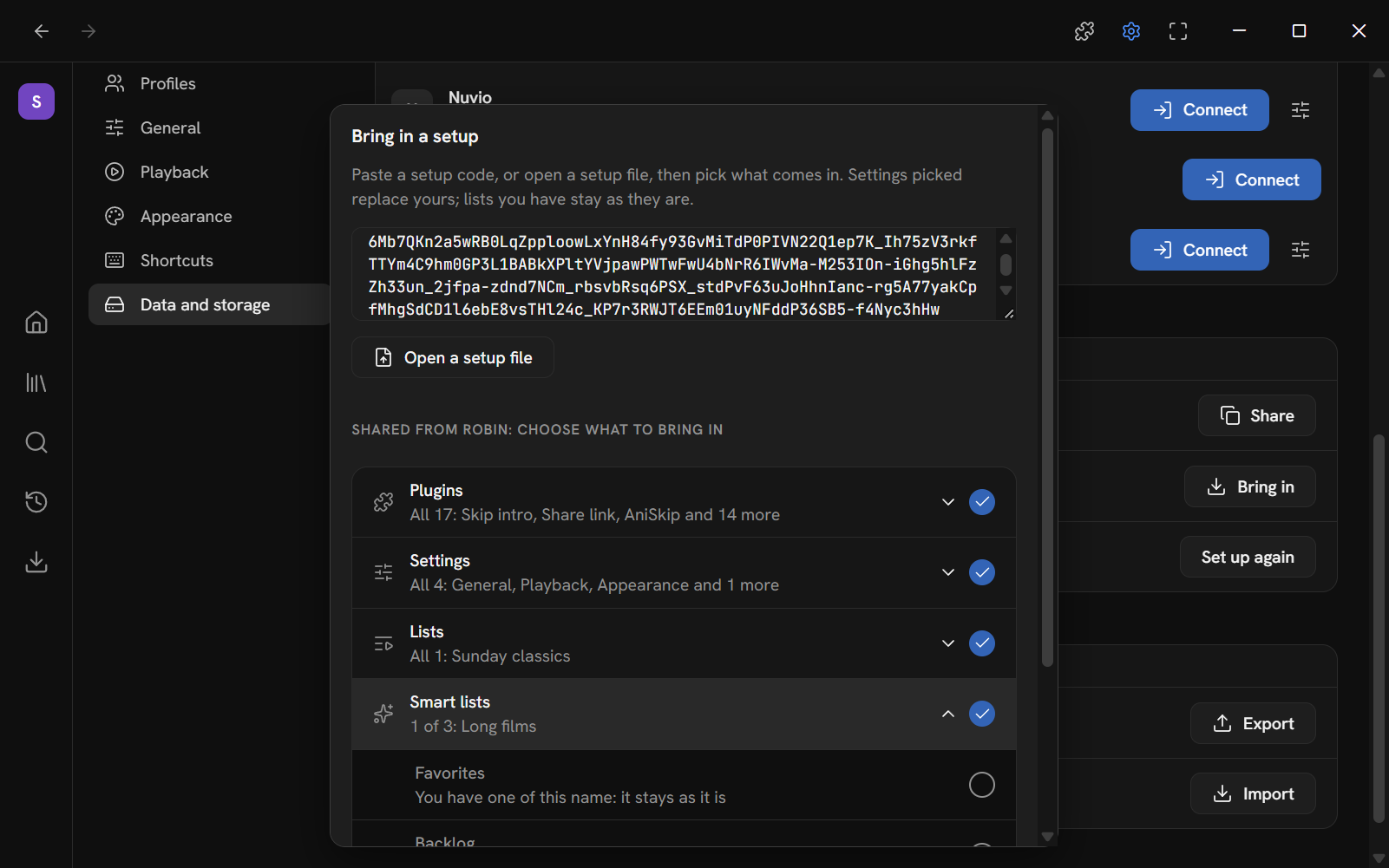
In Settings, the window opens with a reminder: "Settings picked replace yours; lists you have stay as they are."
- Paste the code into the box, or press Open a setup file.
- Mantle reads it a moment after you stop typing. If it is not a setup, it says "That is not a Mantle setup. A setup code starts with mantle1:, or open a setup file."
- Mantle shows who shared it ("Shared from …: choose what to bring in", or "A shared setup: choose what to bring in" if it has no name) and the same rows as when sharing, as the setup would land in the profile you are in. Everything that can be brought in is picked.
- Untick what you do not want. Open a row to pick item by item.
- Keys the setup includes come in with it: under each plugin, a ticked row reads "Take their API key" (or password, or link as set up), "As shared: untick to set up your own". One that would replace a key you have here starts unticked: "In place of yours here: tick to use theirs".
- If the setup installs plugins you do not have, Mantle says so under the rows, for example "It installs Hello and TVmaze, each allowed what it asks for. Bring in plugins only from someone you trust; Plugins can change what each may do." It names the repositories it adds for them too, and adds a repository only if a plugin you picked installs from it.
- Press Bring it in. Everything picked comes in at once, the plugins from elsewhere installed with it. Mantle says what it did, for example "Brought in 4 plugins (2 installed), the settings and 2 lists with 2 titles". If there was nothing new, it says "Nothing new to bring in".
Bringing the same setup in a second time changes nothing.
What cannot be picked
Some things the setup holds cannot come in here. They are shown dimmed, with a line that says why, and are left unpicked:
- A plugin with nowhere to install it from reads "nowhere to install it from".
- A list or smart list of a name you already have reads "You have one of this name: it stays as it is".
How each plugin lands
A plugin's line says whether it is on or off, what it sets, and ends with how it would land in your Mantle. For a plugin you do not have yet, the settings it sets are named by their ids, such as url, and no address is shown.
| Line | What happens |
|---|---|
| (nothing) | You have the plugin. It is turned on or off and set up as shared. |
| keeps its server: it holds your keys or sign-in here | You have the plugin, and it holds a key or a sign-in of yours. It is turned on or off as shared, but keeps its own server and feed addresses, whatever the setup says. |
| installs from a repository or a site | It is not here. It installs when you bring the setup in (see below). |
| installs from a site, set up as shared | A Stremio addon the sharer set up on its own site, its link as set up taken. It installs from that link. |
| comes with Mantle: installs again | One of Mantle's own plugins that you removed. It installs again. |
| set up again on a site | A Stremio addon the sharer set up on its own site, its link not taken. You set it up there after (see below). |
| nowhere to install it from | It cannot be picked. |
| stays off: it needs the desktop or Android app | In the web build: a plugin on in the setup whose service does not let a web page call it, such as Real-Debrid. Its settings come in, and it stays off. See Web and phone. |
What happens to each group
| Group | What it does here |
|---|---|
| Plugins you have | Turned on or off, and their settings set, as in the setup. Secrets are not touched. A plugin that holds your keys or a sign-in keeps its own addresses, and Mantle says so under "Not brought in", for example "… kept its server: it holds your keys or sign-in here". |
| Plugins you do not have | Installed, then turned on or off and set up as in the setup (see below). |
| Settings | Taken a group at a time. A group that is not valid is reported under "Not brought in", and the other groups still come in. Settings picked replace the matching settings of the profile you are in. Shortcut keys come in whole and replace yours: a key you changed that the setup does not have goes back to its default. |
| Lists and smart lists | Added if you have no list of that name. A list you already have is left as it is. The titles in the added lists are added to your library. |
Plugins are shared by the whole device, but each profile turns them on or off for itself. When you bring in plugins, a plugin is turned on or off for the profile you are in. Its settings are the device's, so they change for every profile that can see it. In the first run, what you bring in is also how a profile you add later starts.
Plugins from elsewhere
A setup can use plugins that are not in your Mantle: ones someone installed from a link or a repository, or one of Mantle's own that you removed. When you press Bring it in, Mantle adds the repositories they come from (unless you have them), installs each plugin you picked, allows it what it asks for (network, credentials, folders), and sets it up as it was shared. You can change what each may do afterwards on the Plugins page. See Plugins.
Only bring in plugins from someone you trust. A setup from a stranger can point at any plugin. Before you press Bring it in, the note under the rows names every plugin it installs.
A plugin that cannot be installed (its link cannot be reached, say) is named under "Not brought in", with why, and the rest still comes in.
If nothing is left to do, bringing the setup in ends there. Otherwise Mantle shows what was not brought in, and the addons to set up on their own sites, under "Set up on their sites: each with your own account":
- Each row reads "Set it up on site with your own account, then paste the link it gives". Press Open its site, set the addon up there, and paste the link it gives you into the box.
- Press Install. Mantle reads what the link holds and asks what the addon may do before it installs. Then it is set up as it was shared, and the row reads Installed.
- Press the button at the bottom when you are done. It reads Done in Settings and Continue in the first run. If some addons are left, it reads Done without them ("Done without it" for one), or Continue without them in the first run.
You can install an addon you left out later from the Plugins page.
After you bring a setup in
The setup brings plugins, their settings, and the keys you took. It never brings sign-ins. A plugin that still needs a key or a sign-in now shows Needs setup. Home shows a banner that leads to it. In the first run, the Finish step lists them. See Plugins.
Moving your library
A setup does not carry your library, favourites, progress or history. To move those to another device or profile, use the portable file in Settings → Data and storage → Portable file:
- Export makes "Library, lists and watch history as one file", and says it is not a full backup ("Not a full backup: settings, notes, source picks, reminders and sign-ins are not in it").
To keep everything, use Back up (Settings → Data and storage → Backup and restore: see Back up and restore), or close Mantle and copy
mantle-data(the desktop app); downloads are in their own folders. A Mantle account keeps what syncs of a profile synced to it, which leaves out downloads, Real-Debrid's sign-in and a plugin kept on one device (see What syncs). It is saved as Save to a file is above: written tomantle-data/exportsin the desktop app ("Exported to …"), downloaded by a browser ("Your export is downloading"), or put where the phone's Save dialog says in the Android app. - Import merges a file made on another device. New titles join your library, favourites and watched marks add up, history adds up (a play you already have, the same title, episode and time, is not added again; a different one is kept), progress that is newer than yours wins, and its lists come in. A list of a name you already have takes in the titles it lacks; a smart list with other rules than yours, or a list of another kind, comes in beside yours as "Name (imported)".
Nothing of yours goes, and importing the same file again adds nothing. Mantle keeps your data as it was before the import as
mantle.json.before-import, in its data folder.
This page is made from docs/guide/sharing.md in the repository.