
Your data
This page is for moving Mantle, keeping a copy of what it holds, and putting things right when a file will not open. It says where Mantle keeps your data, how to back it up and restore it, and what it does when it cannot read or save a file.
Where Mantle keeps your data
The desktop app is portable. Everything it keeps lives in a folder named mantle-data, next to the program: settings, profiles, library, plugins, caches and the log. The folder is the profile. Copy it and the copy opens exactly as the original does, with the same keys and sign-ins.
In mantle-data |
What it holds |
|---|---|
mantle.json |
Profiles, libraries, lists, progress, history, plugin settings and the downloads list. |
mantle.json.bak and other mantle.json.… files |
Copies of mantle.json: the latest (made as Mantle starts and every five minutes as it changes), and the ones kept before an import, a restore or a profile's removal. Restore them from Backup and restore. |
secrets.dat and secrets.key |
The keys and sign-ins plugins keep, and your Mantle account's sign-in and key. secrets.dat is encrypted under the key in secrets.key. |
plugins/ |
Plugins you installed from links and repositories. |
logs/ |
The log: mantle.log, and mantle-previous.log once the first passes 1 MB. |
The rest is exports/ (files that Export, Back up and Save to a file write in the desktop app; a browser downloads them instead), cache/ (artwork, providers' answers and the window's data) and mantle.lock.
- One Mantle per folder. A second Mantle on the same folder waits up to five seconds for the first to finish saving, then ends and says why. If the folder cannot be locked (read-only media, say), Mantle runs without the lock and the log says so.
- Downloads are elsewhere. New downloads go to a
Downloadsfolder next to the program. Change it in Settings → Data and storage → Download folders. A folder inside the program's folder is kept relative to it, so the program and its downloads move together. - A missing download folder (a drive not plugged in) shows "Not connected". Nothing is deleted, and downloads go to the next folder. Connected again, all is as it was.
- Each title has its own folder, named as media libraries name them:
Movies/Example Film (2021) [imdbid-tt0000001], holding its files, its details and its pictures. - Downloads keep 1 GB free on a folder's drive, so the drive that holds
mantle-datanever fills and Mantle can always save. A download that reaches that stops with "The drive … is on is full", keeps what it has, and Retry carries on.
The web build keeps the same folder in the browser's storage for its site, and the Android app in its own storage. See Web and phone.
Move Mantle to another computer
- Close Mantle.
- Copy the program and
mantle-datatogether to the new place: another folder, drive or computer. - Run the program there.
Windows needs the WebView2 runtime, which comes with Windows 11 and current Windows 10. Downloads stay in their own folders: move those too, or point Download folders at them.
Keep the folder private
Anyone who has mantle-data, or a copy of it, has your keys and sign-ins. The encryption keeps secrets.dat unreadable on its own (attached to a report, say), not from whoever holds the whole folder. Treat the folder like a password file.
A copy also holds your sign-in to a Mantle account, so run one copy at a time: see Copies of the data folder. In the Android app the key is not in the folder but wrapped by a key of the Android Keystore, so secrets.dat cannot be read from a copy of the app's files.
What Mantle writes outside the folder
Nothing, but for what a program does not control or does only when asked:
- Windows' own traces of running a program (prefetch, jump lists, a USB drive's history).
- The WebView2 runtime each computer has. Its cache is in
mantle-data/cache/webview2, on the drive, kept to 256 MB. - The registry entry that Settings → General → Open Mantle links here writes for
mantle://links. It is off until you turn it on.
Back up and restore
Settings → Data and storage → Backup and restore works in the desktop app, the web build and the Android app.
Make a backup
- Press Back up.
- Type a passphrase twice (at least 8 characters). Mantle cannot recover it, and without it the backup cannot be opened.
- Save the file,
mantle-backup-<date>.json. The desktop app writes it tomantle-data/exports, a browser downloads it, and the Android app asks where.
A backup holds every profile (library, lists, progress, settings, notes and PIN), the plugins with their settings, data and keys, the download folders and the downloads list, and your Mantle account's key. It holds no downloaded files: Mantle finds them again from their folders. It does not hold the code of plugins installed from links, or this device's own sign-in to the account.
Export (see Sharing a setup) is smaller: library, lists and watch history only.
Restore
- Press Restore from a file and choose the backup, or press Restore beside one of the copies Mantle keeps.
- For a file, type its passphrase. A wrong one opens nothing.
- Mantle says when the backup was made and by which Mantle, and lists the plugins that will be installed again. Confirm.
- Mantle restarts to apply it (the desktop app starts itself again; the web page reloads).
A restore replaces what is here; it does not merge. Before it does, Mantle keeps what it replaces as mantle.json.before-restoring-<number> (the last five). Mantle refuses:
- a backup from a newer Mantle ("update Mantle, then use it");
- a backup of another Mantle account than this device is signed in to ("Sign out of it here first"; a device with no account takes any);
- a restore that would remove or change a profile's PIN. Take the PIN off first (Settings → Profiles).
Plugins installed from links come back off, with no permissions, so you are asked for each one's. The Plugins page lists them as Waiting to be installed again, each with Not here. A plugin private to one profile is not brought back. Profiles synced with your account give way to the account once, so a backup's older values do not spread to your other devices.
If a restore cannot finish, Mantle does not start. It says "Mantle couldn't finish the restore" and offers Try again or Discard the restore, which puts everything back as it was.
The copies Mantle keeps
The same page lists the copies Mantle keeps, each with when it was made, the Mantle that saved it and its size, and a Restore button:
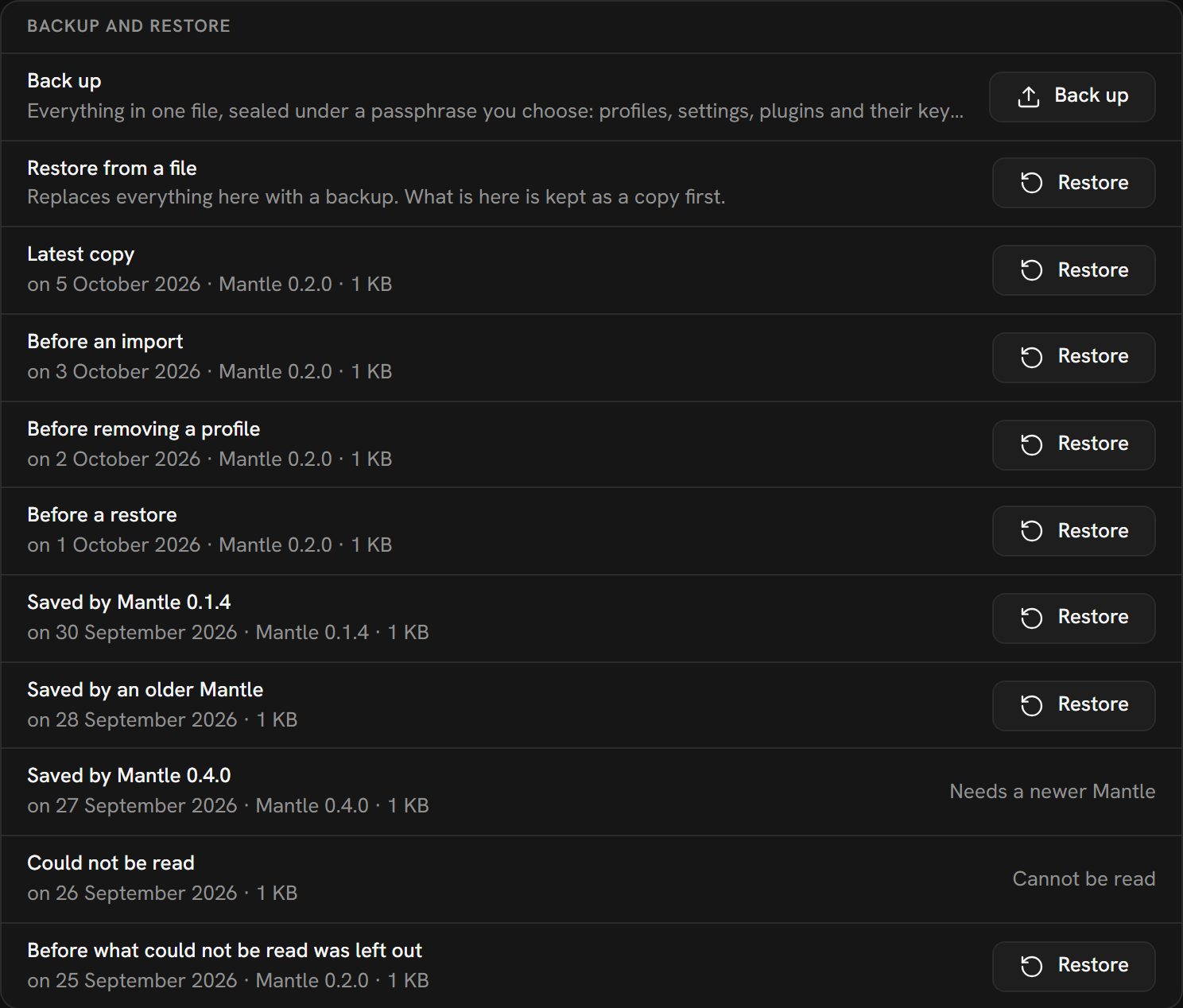
The kinds of copy:
| Copy | When it is made |
|---|---|
| Latest copy | As Mantle starts, and every five minutes as the file changes. |
| Before an import and the like | Before something that changes a lot at once: an import, a shared setup applied, joining a profile, a profile's removal (the last five), a restore. |
| Saved by Mantle … | The file as another version of Mantle left it, kept when this version starts over it (the last three). |
| Could not be read | A mantle.json Mantle could not read at all, set aside as it was. Mantle never writes over it or removes it. |
| Before what could not be read was left out | mantle.json as it was loaded, when Mantle left out something it could not read. |
A copy that cannot be restored says why: Cannot be read, or Needs a newer Mantle. A copy holds no keys: they stay as they are.
By hand in the desktop app: close Mantle, rename mantle.json to keep it, give the copy the name mantle.json, and start Mantle again.
If something goes wrong
Mantle writes each file in full beside the old one, and swaps it in only once it is on the disk. A crash or a power cut leaves the old file or the new one, never half of one.
- Mantle cannot save. It says so at the top of the window and why (the disk is full, or another program holds the file), and tries again every second. What was saved before is never replaced by a half-written file.
mantle.jsoncannot be read. Mantle keeps it asmantle.json.unreadable-<date>-<time>and opensmantle.json.bak: "Mantle opened its saved copy". What changed after that copy is not in it, but profiles synced with your account get what your account has. With no copy either, Mantle starts afresh and says so ("Mantle started afresh"). If the file is only busy at the moment, Mantle tries again and does not start afresh over it.- Mantle stopped, or a file was put back from before, between its saves. Mantle keeps what it synced with your account in
together.json, and savesmantle.jsonbefore it. If the two are not of the same moment when Mantle starts (it was killed between them after it had taken something from your account, or in the middle of taking it, a copy of one was put back, ormantle.jsonis gone), the profiles synced with your account take what your account has, instead of deleting there what they lack. Nothing is lost on your other devices. On this device, what was changed since it last synced gives way: something you edited that your account has comes back as your account has it, and so does something you removed; what you added is kept and goes up. A change made here that has not synced yet, with nothing taken from your account since, is not given up: it goes up when Mantle starts again. A stop while an older version of Mantle (from before this check) was running is not seen when this one starts next. If most of a profile's synced items, or 250 or more, are missing when Mantle starts, it does not delete them from your account either, and says so in its log and in Settings → Account (see Deletions held back). - The file is from a newer Mantle. It is read as far as it can be, and what this version has no place for is kept and written back, so going back and forth loses little. A setting or list this version cannot read is left out, and the file is kept as
mantle.json.before-unreadable. If what you made cannot be read (or the file's version is higher than this Mantle's), Mantle says "What Mantle saved last is from a newer version of Mantle that this version can't read", keeps the file asmantle.json.unreadable-<date>-<time>, and opens the newest copy it can read. secrets.datcannot be read. Mantle keeps it assecrets.dat.unreadable-<date>-<time>(it never deletes one) and says "Mantle couldn't read its keys". At each start it reads those set-aside files too, and takes in their secrets wheresecrets.dathas none. A plugin signed in only in a file that could not be read asks you to sign in again. Asecrets.keythat is not a key is kept the same way and a new one is made.- Going back to an earlier version sets the encrypted file aside and starts without those keys; the version after takes them back.
This page is made from docs/guide/your-data.md in the repository.